
Facebook Ads for a Wisconsin Political Campaign
Facebook and Instagram can put your name in front of the right voters for a few dollars a day. They can also burn your money fast if you start without a plan.
 Tony Ruffi10 min read
 Add as a preferred source on Google
Political ads also come with extra steps that other ads skip. You will learn what to set up first and who to show your ads to. You will also learn what to say, what to spend and how to tell if an ad is working.
Plan, launch, check
Do Facebook & Instagram ads help a local Wisconsin campaign?
They can, if you use them for one job at a time. Ads reach voters who may never open your mail or come to your event, and you can aim them at the area where you are on the ballot. They work best next to door knocking, mail and a good website, not in place of them.
- Finish the sign-up first. Political ads need an approved account before they run.
- Own the landing spot. Send people to your website, not only to a social page.
- Pick one job per ad. Sign up, volunteer, give, or learn your name.
- Start small and test. Two or three short ads beat one long one.
- Check results every week. Move money to what works.
Think of a social ad as a sign that follows people around. A yard sign sits in one spot. An ad shows up on the phones of people in your district while they sit in line or on the couch. Our social media article covers the posts you do for free, and this article covers the ones you pay for.
What do you need to do before your first ad runs?
Set up your page, your website and your advertiser account before you spend a cent. Meta, which owns Facebook and Instagram, says ads about elections or politics need an approved advertiser and a "Paid for by" label. It can turn ads down without them. Rules change, so read Meta's political ad page before you start.
Here is the order we use with candidates:
- Build your website first. Ads need a place to send people. Our campaign website article shows what to put on it. Always own your domain name, which is your web address, and never let a builder or a friend own it for you.
- Make one clean campaign page. Use your real name, a good photo and a link to your site.
- Start the advertiser sign-up. Expect to prove who you are. Do it early, because steps like this can take time.
- Write your "Paid for by" line. Use the exact name of your campaign.
- Add Meta's tracking code to your site. It is a small bit of code, called a pixel, that notes who visited. That lets you show a follow-up ad to people who already looked at your site.
Meta has also limited new political ads in the last days before some elections. Check its current notice, then plan to launch early so a pause does not catch you without ads.
A note on rules: Wisconsin has its own "paid for by" rules for messages that urge people to vote for or against a candidate, and they cover more than signs and mail. The Wisconsin Ethics Commission explains them. Read that page, then check with your filing officer, which is the clerk or office where you file your papers. Check with the Wisconsin Elections Commission too. Our paid for by article gives the basics. This is a plain-English overview and not legal advice.

How do Facebook & Instagram audiences differ?
They differ most by age. Pew Research Center finds about seven in ten U.S. adults use Facebook and about half use Instagram. Instagram leans young, with most adults under 30 on it. Facebook reaches more adults in their 30s, 40s, 50s and beyond. So the platform you pick decides which voters you reach.
Know your audience before you spend a dollar. Ask who votes in your race, then pick the place where those voters spend time. A voter who is 68 is far more likely to be on Facebook than Instagram. A voter who is 24 is more likely to be on Instagram.
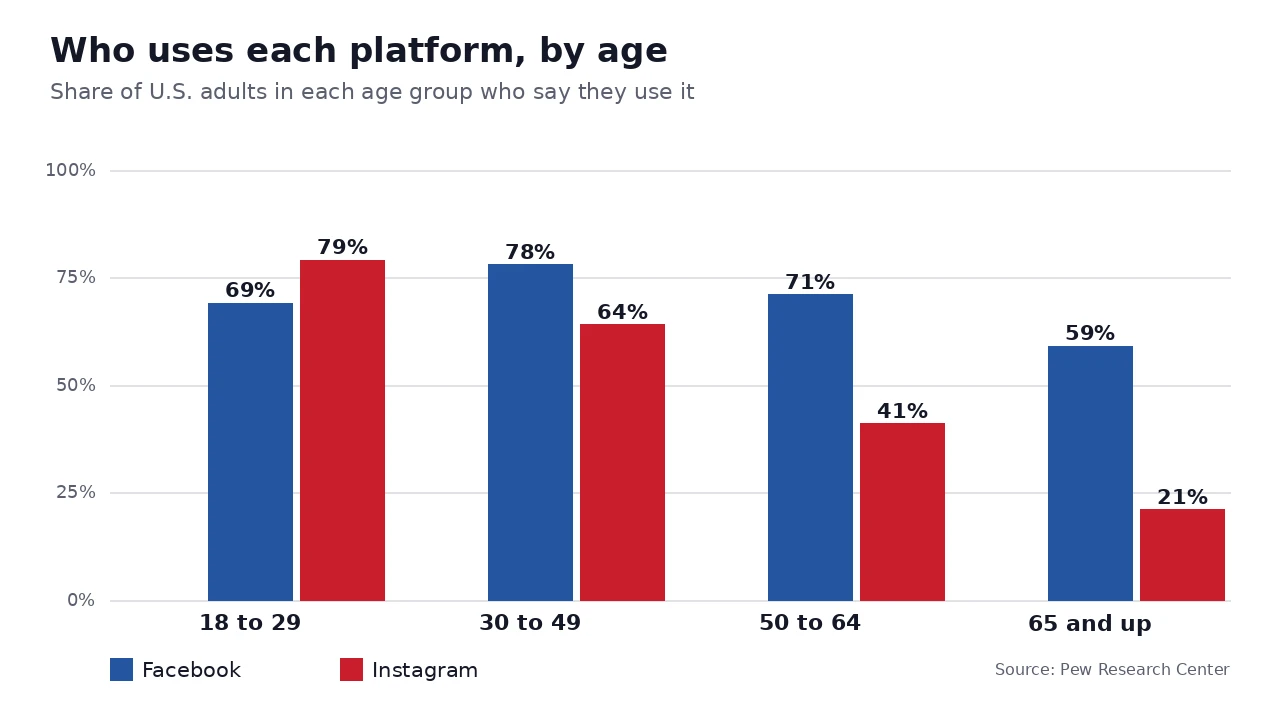
Here is what the chart tells us. Facebook is the broad reach tool, strong with ages 30 to 64 and still used by about six in ten adults 65 and older. Instagram is strong with voters under 30, and use drops fast after 50. In local races, the voters who turn out most are often older, so Facebook is usually the first home for ads.
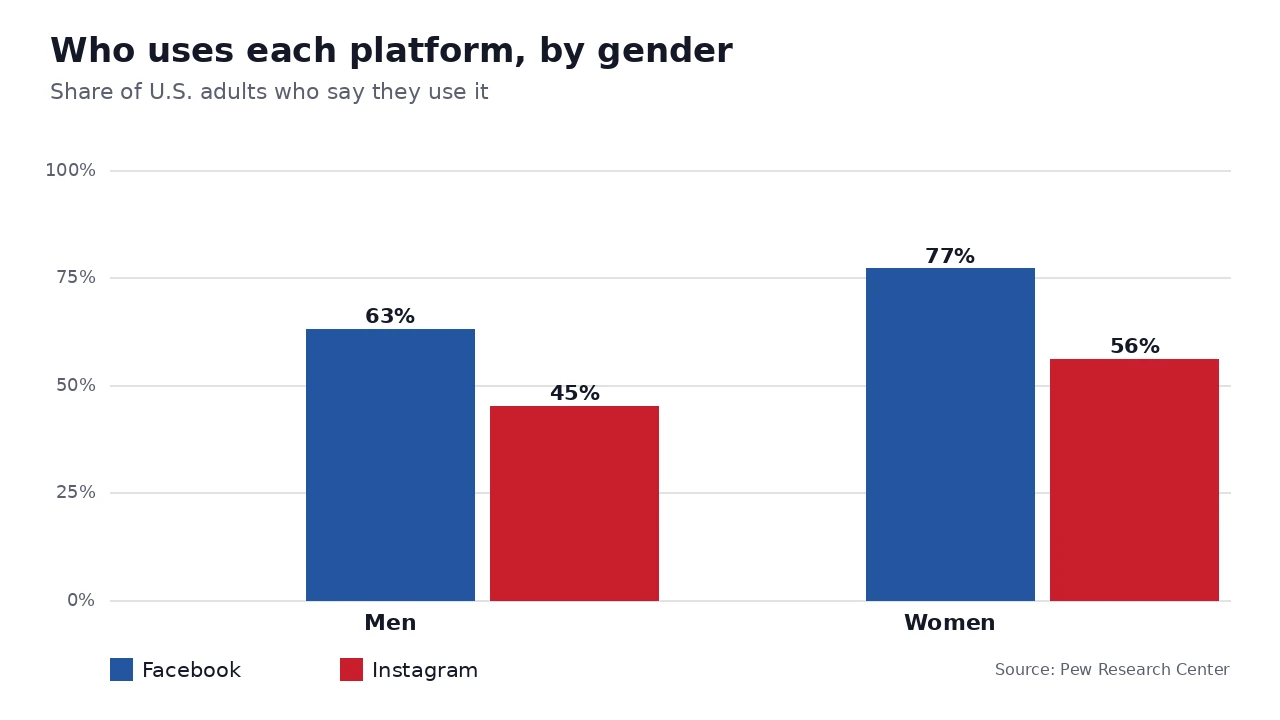
Gender matters too. In the same Pew survey, more women than men say they use each platform. That is worth knowing if your race has a lot of women voters, such as a school board race.
Here is how we sum up the two:
| Reach among U.S. adults | About 7 in 10 | About 5 in 10 |
| Strongest age groups | 30 to 64 | 18 to 29, then 30 to 49 |
| Weakest age group | 65 and up, but still about 6 in 10 | 65 and up, about 2 in 10 |
| Best for | Local voters, older voters, groups and events | Younger voters, short video, a look behind the scenes |
| Content that tends to fit | Short video, clear photos, event posts, posts people share in local groups | Vertical video (Reels), carousels (swipe posts with several slides) and Stories |
The content row is our field practice, not a Pew finding. Studies that compare formats disagree on whether short video or carousels win on Instagram, so test both with your own voters. Do not trust one study over what your own numbers show.
Pew's numbers are for the whole country, not Wisconsin, and they show who uses a platform, not who will vote for you. Use them to start your plan, then check them against your own results. Meta's ad tools also let you see the age and gender of the people your ad reached, so you can see if you hit the voters you wanted.
Here is how we put it to work:
- Look at your voters first. Think about who votes in your race and how old they tend to be.
- Start on Facebook for most local races. It reaches the widest group of voters.
- Add Instagram for younger voters. Use vertical video made for a phone.
- Change the ad to fit the place. The same message can be longer and plainer on Facebook, and faster and more visual on Instagram.
- Check who saw it. If the wrong age group saw it, change your audience.
Who should see your ads first?
Start with people who already know you, then widen the circle. The first group is your email list and the people who visited your website. The second is voters who live in your district. A small, close audience costs less and teaches you more than a huge one.
Here is how we order the audiences for a local race:
| Order | Who | Why start here |
|---|---|---|
| 1 | People who visited your website | They already showed interest |
| 2 | Your email list and supporters | They will click, share and give |
| 3 | People in your district, by area | They can vote for you |
| 4 | Groups tied to your issues | They care about what you stand for |
Aim by place, not by guess. If you run for village board, show the ad only where those voters live. Wisconsin is big, and an ad that shows up two counties over is money you will not get back. Our email list article shows how to grow the second group.
What should your ad say and show?
Say one thing, show your face and ask for one action. Most people give an ad a second or two, so open with who you are and why you are running, in plain words. Use a short vertical video if you can, since people hold their phones upright. Add words on the screen, because many watch with the sound off.
Here is the shape we start with:
- Show your face in the first second.
- Say who you are and what you want to fix in one sentence.
- Give one reason to trust you, like a job you have held or a thing you have done.
- Ask for one action, such as "Sign up to help" or "Learn more."
- End with your name and the office.
Keep the ask the same for each ad, so you can compare them. Our phone video article shows how to film one that looks good and sounds clear.

How much should a first-time candidate spend?
Start small and grow what works. A few dollars a day, aimed at a small local audience for a week or two, is enough to learn which ad and which audience do better. How much you spend after that depends on your office and your whole budget. Our campaign budget article shows where ads fit beside mail, signs and video.
Do not try to buy a result with one big week of ads. Spread the money out, so voters see your name more than once. Hold some back for the last stretch too, since that is when more people start to pay attention.
Want a second set of eyes on your ads before you spend? Our consultants help candidates in every corner of Wisconsin, from the Northwoods to the Mississippi, at every level of the ballot. Your first call is free.
What did a new Wisconsin district show us about social media?
It showed us that when voters do not know you, what they find online does a lot of work. In 2024, we ran the online side of Brent Jacobson's race from start to finish. That meant social media, video, his main message and his look. It was in a new four-county Assembly district, drawn when the state's maps were redrawn. He won his August primary with 75% of the vote and the November election with 66%, or 23,885 votes (case study).
We are not saying ads alone did that, because a lot of work went into the race. We are saying that in a new district, most voters meet your name for the first time on a phone. That first look has to be clear, and it has to match your website.
Where first-timers slip
The most common slip is a vague ad. "Vote for change" tells a voter nothing, while "I want to fix the roads on our side of town" does. The next is sending people to a page with no clear next step. The last is giving up after two days, before there is enough data to learn from.
How do you know if an ad is working?
Look at actions, not likes. A like is nice, but a sign-up, a volunteer form or a gift is worth far more. Once a week, write down what you spent, how many people took your action and what each one cost. Keep the ad that costs less per action, and pause the one that does not.
Here is what to check each week:
- Did people take the action? Count sign-ups, volunteers or gifts, not likes.
- Which ad did better? Keep that one and pause the other.
- Who saw it? Make sure it reached your district and not the next county.
- Is the ad getting stale? If people have seen it again and again, make a new one.
- Are the rules covered? Look at your "Paid for by" line on each ad.
Meta keeps political ads in a public library that anyone can search, so assume that voters, reporters and the other side can see every ad you run. Write each one as if it will be read out loud.
Your first week of ads, day by day
Spend a week learning before you spend a month. Here is a simple plan, and you can change it to fit your race. Write the results down each night so the next day's choice is easy.
| Day | What to do |
|---|---|
| Before day 1 | Finish sign-up, set up your page, your site and your tracking code |
| Day 1 | Launch two short ads to people who visited your site |
| Day 2 | Check that both ads show your "Paid for by" line and reach the right area |
| Day 3 | Add a third ad, aimed at your email list and supporters |
| Day 4 to 5 | Let them run. Do not change anything yet |
| Day 6 | Compare the cost per sign-up. Pause the weaker ad |
| Day 7 | Write a new ad that copies the winner, and plan next week |
Want help with your first ads? Our phone is 715-314-3250, and you can book a free first call whenever you are ready.
Facebook ad questions we get
Do I need special approval to run political ads on Facebook?
Yes. Meta says ads about elections or politics need an approved advertiser account and a "Paid for by" label, and it can turn down ads that skip these steps. The sign-up steps change, so read Meta's current page and start well before you want the ads to run.
Is boosting a post the same as running an ad?
Yes, treat it that way. A boosted post is paid reach, so the same political ad rules apply to it. Finish your sign-up first, then boost. Check Meta's page to confirm how it treats boosts today, and never wait until the last week to start, because the sign-up can take time.
How much money do I need to start?
Less than most people think, as long as the ad has one clear job. A few dollars a day to a small, local audience is enough to learn what works. Our budget article shows where ads fit with mail, signs and the rest.
Should I send people to my website or my Facebook page?
Send them to your website. It is yours, so you decide what it says and what people do there, such as sign up, volunteer or give. A page on a social site can change its rules without asking you, and you must own your domain name.
Do Wisconsin's "paid for by" rules apply to my ads?
They can. Wisconsin has its own rules for messages that urge people to vote for or against a candidate, and they cover more than yard signs and mail. Check the Wisconsin Ethics Commission page and ask your filing officer. This is a plain-English overview and not legal advice.
Can Bluejack help with ads anywhere in Wisconsin?
Yes. We work with candidates across all of Wisconsin, including the Northwoods, at every level from school board to Congress & governor. We can help you pick an audience, shape the ads and read the results. Book a free consultation to start.
Fact-checked November 9, 2026 against Bluejack field practice, the Wisconsin Ethics Commission attribution page, Meta's political ad policy page (as summarized by search; the site itself was blocked here) and the Bluejack Brent Jacobson case study.
- Pew Research Center, Americans' Social Media Use 2025 (survey fielded Feb to June 2025) and its social media fact sheet, age and gender tables accessed Nov 9, 2026
- Meta, Ads about Social Issues, Elections or Politics (policy page; not reachable from our research environment, so claims here are kept general and readers are told to confirm) accessed Nov 9, 2026
- Wisconsin Ethics Commission, attribution and disclaimer requirements accessed Nov 9, 2026
- Wisconsin Elections Commission, candidate and filing information accessed Nov 9, 2026
- Bluejack case study, Brent Jacobson, Wisconsin State Assembly District 87, 2024 accessed Nov 9, 2026